<?xml version="1.0" encoding="utf-8"?>
<feed xmlns="http://www.w3.org/2005/Atom">
 <id>//s.zeid.me/</id>
 <title>S. Zeid</title>
 <icon>/favicon.ico</icon>
 <author>
  <name>S. Zeid</name>
  <uri>https://s.zeid.me/</uri>
 </author>
 <updated>2025-02-12T20:46:32-06:00</updated>
 <link href="//s.zeid.me/blog/feed/" rel="self" />
 <link href="//s.zeid.me/" />
 <entry>
  <id>//s.zeid.me/blog/2013/10/29/holly-bella-wallace/</id>
  <title>Holly Bella Wallace</title>
  <updated>2013-10-29T06:31:00-05:00</updated>
  <published>2013-10-29T06:31:00-05:00</published>
  <link href="//s.zeid.me/blog/2013/10/29/holly-bella-wallace/" />
  <content type="html"><![CDATA[
   <p><a href="//s.zeid.me/blog/2013/10/29/holly-bella-wallace/2013-01-07%2016.07.55_m3.jpg"><img src="//s.zeid.me/blog/2013/10/29/holly-bella-wallace/2013-01-07%2016.07.55_m3.small.jpg" alt="" /></a><!--_--><br />
   <span style="font-size: small;">Monday, January 7, 2013</span></p>
   
   <h2 id="holly-bella-wallace">HOLLY BELLA WALLACE</h2>
   
   <p><strong>Born:</strong>  circa April 2003<br />
   <strong>Became beloved:</strong>  circa Saturday, December 20, 2003<br />
   <strong>Died:</strong>  Thursday, October 24, 2013, ~5:15 PM CDT</p>
   
   <p>I will always love you, sweet Holly.  You beautiful, sweet baby girl.</p>
   
   <p> <br />
   <a href="//s.zeid.me/blog/2013/10/29/holly-bella-wallace/00008.jpg"><img src="//s.zeid.me/blog/2013/10/29/holly-bella-wallace/00008.small.jpg" alt="" /></a><br />
   <span style="font-size: small;">Saturday, March 29, 2008</span></p>

  ]]></content>
 </entry>
 <entry>
  <id>//s.zeid.me/blog/2013/09/29/adventures-in-the-evil-land-of-itunes/</id>
  <title>Adventures in the Evil Land of iTunes</title>
  <updated>2013-09-29T21:08:00-05:00</updated>
  <published>2013-09-29T21:08:00-05:00</published>
  <link href="//s.zeid.me/blog/2013/09/29/adventures-in-the-evil-land-of-itunes/" />
  <content type="html"><![CDATA[
   <p>I was in the U.S. iTunes store in my Windows VM, fruitlessly searching for the
   album for Ludovico Einaudi’s 2007 iTunes Festival performance (I was using
   iTunes only because it’s from the <em>iTunes Festival</em>; I avoid anything made by
   Apple to the fullest extent possible), when I found this:</p>
   
   <p><img src="//s.zeid.me/blog/2013/09/29/adventures-in-the-evil-land-of-itunes/album-in-search-results.png" alt="The album &quot;Selected Letters of Sergei Rachmaninoff&quot; by Anton Batagov in the
   iTunes US search results for &quot;Einaudi&quot;." /></p>
   
   <p>I was wondering why it would show up in the search results for Einaudi, so I
   clicked on it only to find this:</p>
   
   <p><img src="//s.zeid.me/blog/2013/09/29/adventures-in-the-evil-land-of-itunes/album-page-itunes.png" alt="The album page in the iTunes app.  Track 5 has 100% popularity, and the other
   tracks have zero popularity." /></p>
   
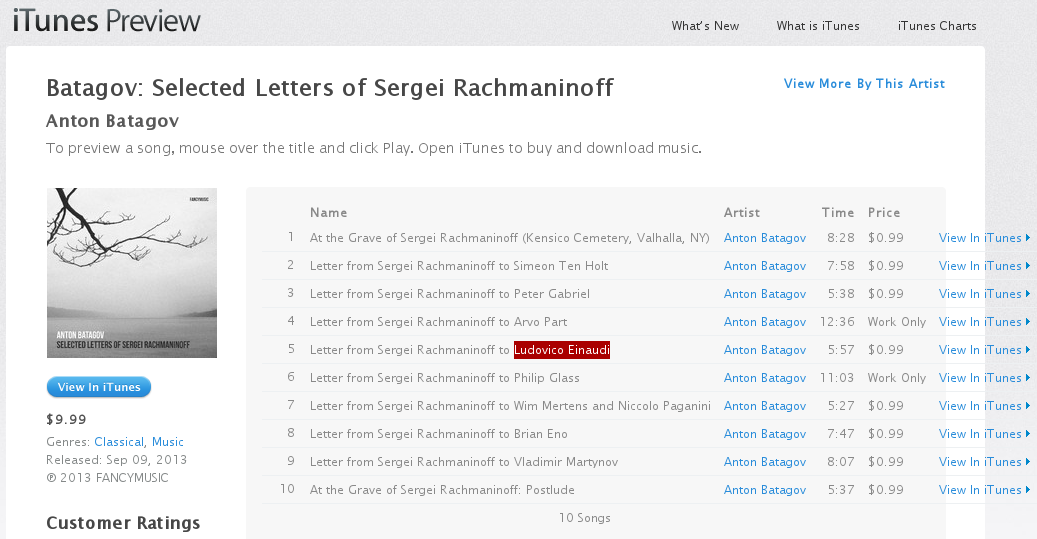
   <p>Of course, it doesn’t show the full track names in a tooltip, so I go to the
   Web page for it.  Of course, <em>it</em> doesn’t show tooltips either, so I fiddle
   around with the CSS a bit to widen the column and see this:</p>
   
   <p><img src="//s.zeid.me/blog/2013/09/29/adventures-in-the-evil-land-of-itunes/album-page-web.png" alt="The album page in the iTunes Web site, modified to show the full track names.
   Track 5 is called &quot;Letter from Sergei Rachmaninoff to Ludovico Einaudi&quot;, and
   Ludovico Einaudi's name is highlighted." /></p>
   
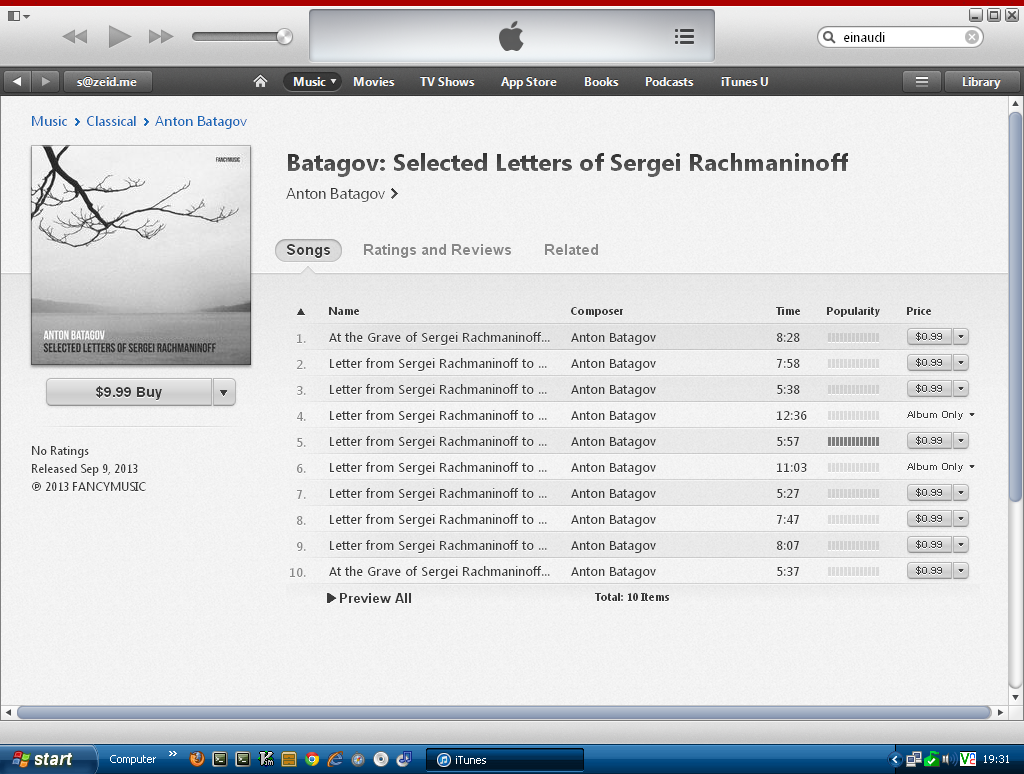
   <p>I looked back at the page in the iTunes app and noticed that track five is the
   only popular song on the album.  After seeing the full name of the track, it’s
   little wonder why!  XD</p>
   
   <p>P.S.  It’s a beautiful album; you should listen to it!  (Through <a href="http://fancymusic.bandcamp.com/album/selected-letters-of-sergei-rachmaninoff">a place other
   than iTunes</a>, of course!)  You should also read <a href="http://www.batagov.com/zvuki/rachmaninoff_e.htm">Anton Batagov’s
   write-up about his inspiration for the album</a>.  (Also, track 4 should
   say “Arvo Pärt”, not “Arvo Part”.)</p>
   
   <p>P.P.S.  Why the fuck do I have to <del>set up a proxy in Ireland</del> hunt down
   an obscure music store in New Zealand in order to buy Ludovico’s 2007 iTunes
   Festival album‽‽‽</p>
   
   <p>P.P.P.S.  Einaudi’s 2013 iTunes Festival concert is fucking epic.  If only it
   were lawfully available for download, and outside of iTunes….</p>
   
   <p><strong>Update (2013-10-02):</strong>  I was able to get Ludovico’s 2007 iTunes Festival,
   finally.  It only took about six hours of Googling in order to find a music
   store in New Zealand that didn’t check my billing address to see if I’m in
   the right country, and then I had to wait about 12 hours for them to manually
   release the order, and even then their download page was buggy.  I <em>really</em>
   wish the record labels would get their shit together.  I should probably do
   a more detailed blog post about all the troubles I’ve had getting Ludovico’s
   full discography and how his record labels (yes, he’s actually signed to more
   than one label) are fucked up.</p>
   

  ]]></content>
 </entry>
 <entry>
  <id>//s.zeid.me/blog/2013/03/18/fun-with-google-reader-json-files/</id>
  <title>Fun with Google Reader JSON files</title>
  <updated>2013-03-18T20:49:00-05:00</updated>
  <published>2013-03-18T20:49:00-05:00</published>
  <link href="//s.zeid.me/blog/2013/03/18/fun-with-google-reader-json-files/" />
  <content type="html"><![CDATA[
   <p>So if you haven’t heard already, <a href="http://googlereader.blogspot.com/2013/03/powering-down-google-reader.html">Google Reader is shutting down on July 1, 2013</a>. 
   However, until then, you can <a href="https://goo.gl/zijsh">take your data out using Google Takeout</a>
   and you’ll have all your subscriptions and starred, liked, and shared articles. 
   The problem is that the article lists are JSON files with a custom schema that
   there aren’t (as far as I know) any user-friendly parsers for, so I made one.</p>
   
   <p><a href="https://stella.s.zeid.me/">Stella</a> runs entirely in your modern, standards-compliant, <a href="https://developer.mozilla.org/en-US/docs/DOM/FileReader">HTML5
   FileReader API</a>-supporting Web browser (you are using <a href="https://www.mozilla.org/en-US/firefox/fx/">one</a>,
   right?) and lets you view any Google Reader article list in JSON format, including
   your starred, liked, shared, and notes lists, as well as any subscriptions you’ve
   exported in JSON format (more on that in a minute).  All you have to do is click
   “Select JSON file”, select your file, and start reading!</p>
   
   <p>Stella also lets you save a static HTML page which you can view offline.  The page
   will also contain an exact copy of the JSON file you selected (with HTML special
   characters escaped).  (Clicking “Static page” will only give you a Save As screen
   in a few browsers, notably Chrome 14+ and Firefox 20+.  Other browsers will show
   the static page in a new tab, and you’ll need to right-click the link or page
   and choose “Save Page/Link As” to save it.  Also, saving static pages will only
   work at all in <a href="https://developer.mozilla.org/en-US/docs/DOM/Blob#Browser_compatibility">browsers that support the Blob API</a> (look under “<code>Blob()</code>
   constructor”).)</p>
   
   <p>It’s worth noting that Google Reader JSON files <em>do</em> contain the full contents of
   each article, and Stella does let you view those.</p>
   
   <p><a href="https://code.s.zeid.me/stella">The source code to Stella is available on GitLab</a> and is released
   under the X11 License.  If you modify the JavaScript or CSS files, run <code>make</code> to
   regenerate the <code>stella.combined.{js,css}</code> files; otherwise, you won’t see your
   changes.</p>
   
   <h3 id="exporting-feeds-as-json-files">Exporting feeds (or folders) as JSON files</h3>
   
   <p><a href="//s.zeid.me/blog/2013/03/18/fun-with-google-reader-json-files/#exporting-feeds-as-json-files">(Permalink to this section)</a> 
   Now, I mentioned earlier that you can export your subscriptions as JSON files as
   well.  This also exports the article contents.  <strong>This is insanely useful as
   Google Reader keeps an archive of <em>EVERY ARTICLE EVER POSTED IN THE FEED</em>, even
   if they were posted after you subscribed to the feed (but after at least one
   person has done so), even for feeds that have since been removed by their
   publishers.</strong>  This is one thing that I’ve really loved about Google
   Reader, and I’m thrilled to learn that you can export every article ever posted
   in a feed that has been subscribed to in Google Reader.  Oh, and it works for
   folders, too!</p>
   
   <p>To export a feed or folder as a Google Reader JSON file:</p>
   
   <ol>
     <li>Open the subscription in Google Reader.</li>
     <li>
       <p>In the URL in your browser’s location bar, replace “<code>/view/#stream/</code>”
   with “<code>/api/0/stream/contents/</code>”. So, for example,</p>
   
       <pre><code>https://www.google.com/reader/view/#stream/feed%2Fhttp%3A%2F%2Fxkcd.com%2Frss.xml&#x0a;</code></pre>
   
       <p>would become</p>
   
       <pre><code>https://www.google.com/reader/api/0/stream/contents/feed%2Fhttp%3A%2F%2Fxkcd.com%2Frss.xml&#x0a;</code></pre>
     </li>
     <li>Add <code>?n=999999999</code> to the end of the new URL.  If you skip this step, it would
   only give you the first 20 or so articles in the feed, although it appears that
   there’s still a limit of one thousand articles.  If your feed has more than
   999,999,999 articles (which would be insanely unlikely), you would want to
   increase that number.</li>
     <li>Hit <code>Alt</code>+<code>Enter</code> to open the JSON file in a new tab.  From here, you can
   right-click and choose “Save Page As” to save it, but be sure to give it
   a filename that ends in “<code>.json</code>”.</li>
     <li>(Optional) Open the file in <a href="https://stella.s.zeid.me/">Stella</a>!</li>
   </ol>
   
   <p>I cannot stress enough that if you want to do this, and/or export your starred,
   saved, shared, and notes lists, <strong>you MUST do it before July 1, 2013</strong>, as that
   is the date that Google Reader shuts down.</p>
   

  ]]></content>
 </entry>
 <entry>
  <id>//s.zeid.me/blog/2012/11/03/new-site/</id>
  <title>New Site</title>
  <updated>2012-11-03T17:51:00-05:00</updated>
  <published>2012-11-03T17:51:00-05:00</published>
  <link href="//s.zeid.me/blog/2012/11/03/new-site/" />
  <content type="html"><![CDATA[
   <p>So, about a month ago, I redesigned my site and moved it to
   <a href="https://github.com/mojombo/jekyll">Jekyll</a>.  The impetus for this was
   that after a WordPress update, my site basically broke:  top-level pages
   (e.g. <code>me.srwz.us/about</code> would work, but not, say, <code>me.srwz.us/iphone/appbackup</code>)
   and I couldn’t find the cause.  Also, WordPress is slow as fuck on my
   server, and I was tired of having to use a GUI (and a slow one at that)
   to update my site.  I’m a command-line guy, so why not edit my site on
   the command line?</p>
   
   <p>So I spent about a couple of weeks, starting on around September 26, doing
   pretty much nothing but going to class and working on the new site, finally
   getting it up on October 5, I think.  Most of that time was spent working on
   <a href="https://code.s.zeid.me/site-design/src/main/plugins/sitenav.rb">the site navigation plugin</a>, closely followed by
   <a href="https://code.s.zeid.me/site-design/src/main/layouts/">the Liquid templates</a>,
   since I was wanting to replicate most of the functionality from my old
   WordPress site, which proved to take a rather large amount of coding.  I also
   added some new functionality, like subpage listings and tables of contents in
   the sidebar on pages (see <a href="//s.zeid.me/projects/">Projects</a> and <a href="//s.zeid.me/projects/appbackup/">AppBackup
   </a> for examples).  Currently missing are blog
   archives and comments (I’m wanting to use
   <a href="https://code.google.com/p/jskomment/">jskomment</a> or make my own comment
   system using <a href="https://github.com/andrewljohnson/CommentWidget">TrailBehind’s Comment Widget
   </a> and a minimalistic PHP
   backend).  I really don’t want to use a third-party hosted comment system
   like Disqus because I don’t want the comments to be dependent on a third
   party which could go out of business or otherwise lose or remove them.</p>
   
   <p>This was my first real experience with Ruby, which is a rather
   interesting language, and with responsive design (try visiting my site
   on your smartphone, or just resize the window (or press <code>Ctrl-Shift-M</code>
   if you’re running Firefox 16 or later to open Responsive Design View)
   to see the mobile version), so all of this was a really good learning
   exercise as well.</p>
   
   <p>As for the design itself, well, I didn’t really have a specific plan for
   it, but I kind of just had a rough idea in my head of what I wanted and
   just made it as I went along.  I ended up rewriting the stylesheets using
   <a href="http://learnboost.github.com/stylus/">Stylus</a>, which I chose mainly
   because I liked the syntax better than that of LESS and SASS (and
   <a href="http://learnboost.github.com/stylus/docs/mixins.html">transparent mixins</a>
   in particular).  This was actually my first experience using a CSS
   preprocessor, and I must say it’s much more pleasant than writing plain
   CSS, although I was surprised at the huge difference in the sizes of the
   Stylus sheets (653 lines total, including blanks) and the compiled CSS
   files (1,619 lines total).  (The largest stylesheet by far is <code>screen</code>,
   with the <a href="https://code.s.zeid.me/site-design/src/main/styles/screen.styl">Stylus version</a>
   being 258 lines long and the <a href="//s.zeid.me/styles/screen.css">compiled version</a>
   being 1,082 lines long.  This may be due in part to some inefficient loops
   and stuff.  I should probably turn on GZIP compression in lighttpd to make
   up for it.)</p>
   
   <p>Oh, and speaking of lighttpd, I did move my site over to lighttpd.  I was
   using <a href="https://en.wikipedia.org/wiki/Cherokee_%28web_server%29">Cherokee</a>
   since mid- or late 2010 because I got fed up with Apache’s config format
   and out of laziness, but of course I now find configuring lighttpd in Vim
   easier than having to use a buggy Web interface (having the page jump up
   to the top every time I click out of a text box is really annoying).  I
   did look at nginx a lot, but the ability to <a href="http://redmine.lighttpd.net/projects/lighttpd/wiki/Docs_ModDirlisting#dir-listingexternal-css"><em>properly</em> add
   </a>
   custom <a href="//s.zeid.me/.dir-listing.css">CSS</a> to directory listings (as opposed
   to using a <a href="http://nginx.org/en/docs/http/ngx_http_sub_module.html">sub_filter</a>
   hack) sold me on lighttpd (silly reason, I know).  I kind of feel like I
   might like nginx’s config format better, though, but for now I’ve already
   put a lot of work into my lighttpd configuration.  (It’s 333 lines long
   right now, including blanks.  I have a lot of old stuff as well as some
   other things in there.)</p>
   
   <p>Also, the day after I launched my new site, <a href="http://prgmr.com/">my awesome Web host
   </a> upgraded me to a VPS with double the RAM (512 MB)
   and four times the disk space (24 GB) compared to what I had before.  They
   had promised this upgrade last year to everyone (including me) who moved
   over to their new IP address block within the first 30 days, but you had
   to ask for it, and I never did, but then <a href="http://blog.prgmr.com/xenophilia/2012/09/an-inconvienent-page.html">my dom0, <code>cerberus</code>, gave out
   </a>,
   and they decided to just upgrade everyone on cerberus who was eligible.
   So when I logged into my server on the 6th, I noticed that it had rebooted
   recently, but then I noticed in my Byobu status line that my RAM usage was
   at about 495 MB, then checked my disk size, and I was really happy when I
   realized that I had finally gotten the upgrade.</p>
   
   <p>And I’m also happy with my new domain name, <code>zeid.me</code>, and with having
   <code>s.zeid.me</code> as my new home page URL.</p>
   
   <p>So I’m pretty happy with my new site, and in a couple of days, I’ll take
   the <a href="http://www.youvebeenowned.org/">You’ve Been Owned</a> campaign off so
   you can enjoy the design a bit more (if you like it, which I hope you do).
   I do want to start blogging more, and hopefully with my new setup, I’ll
   feel like doing so more often.</p>

  ]]></content>
 </entry>
 <entry>
  <id>//s.zeid.me/blog/2011/08/30/address-already-in-use-error-when-openvpn-is-not-running/</id>
  <title>&quot;Address already in use&quot; error when OpenVPN is NOT running</title>
  <updated>2011-08-30T22:16:33-05:00</updated>
  <published>2011-08-30T22:16:33-05:00</published>
  <link href="//s.zeid.me/blog/2011/08/30/address-already-in-use-error-when-openvpn-is-not-running/" />
  <content type="html"><![CDATA[
   <p>So for the past week or so I’ve been trying to set up a dual-stack-payload OpenVPN
   server.  I was playing around with some IPv6 route settings earlier when it started
   doing this:</p>
   
   <pre><code>$ sudo openvpn /etc/openvpn/server.conf&#x0a;Wed Aug 31 02:41:06 2011 Herp derp, herpity derp derp...&#x0a;Wed Aug 31 02:41:06 2011 TCP/UDP: Socket bind failed on local&#x0a;address [AF_INET]64.71.167.212:1194: Address already in use&#x0a;Wed Aug 31 02:41:06 2011 Exiting due to fatal error&#x0a;&#x0a;$ echo "OH FUCK WHY WONT IT WORK!!!!1!1one!!1!"&#x0a;OH FUCK WHY WONT IT WORK!!!!1!1one!!1!&#x0a;</code></pre>
   
   <!---->
   
   <pre><code>$ cat /etc/openvpn/up.sh&#x0a;#!/bin/sh&#x0a;&#x0a;sysctl -w net.ipv4.ip_forward=1&#x0a;sysctl -w net.ipv6.conf.all.forwarding=1&#x0a;&#x0a;ip link set $dev up promisc on mtu $tun_mtu&#x0a;&#x0a;brctl addif br0 $dev&#x0a;&#x0a;iptables -t nat -A POSTROUTING -s 10.4.4.0/24 -o eth0 -j MASQUERADE&#x0a;&#x0a;service radvd restart&#x0a;&#x0a;true&#x0a;</code></pre>
   
   <!---->
   
   <pre><code>$ sudo lsof -i ":openvpn"&#x0a;COMMAND  PID  USER   FD   TYPE DEVICE SIZE/OFF NODE NAME&#x0a;radvd   2486  root    6u  IPv4  12816      0t0  TCP srwz.us:openvpn (LISTEN)&#x0a;radvd   2487 radvd    6u  IPv4  12816      0t0  TCP srwz.us:openvpn (LISTEN)&#x0a;</code></pre>
   
   <p><strong><em>WHAT???</em> radvd is listening on OpenVPN’s port?</strong></p>
   
   <p>Some background:  I was restarting radvd in the up script because it’s set to
   advertise on tap0, but tap0 doesn’t exist when the system boots, so instead of
   messing with the init scripts, I decided to just restart radvd in the up script.
   However, <strong>since the up script is executed as a subprocess of OpenVPN, it
   apparently inherits OpenVPN’s sockets, and radvd in turn inherits the shell script’s
   sockets</strong>, causing problems when you restart OpenVPN (even with SIGHUP, I would
   assume). *</p>
   
   <p>Now I do have <code>IgnoreIfMissing on;</code> in my radvd.conf file (it’s not the default
   yet in the radvd 1.7 that ships with natty), but I didn’t realize that starting
   radvd <em>succeeded</em> when tap0 didn’t exist, which is why I was doing it in the up
   file.  radvd rereads its config file on SIGHUP, so to fix the issue, I simply
   changed this line in the up script:</p>
   
   <pre><code>service radvd restart&#x0a;</code></pre>
   
   <p>to:</p>
   
   <pre><code>kill -HUP `cat /var/run/radvd/radvd.pid`&#x0a;</code></pre>
   
   <p>and restarting OpenVPN worked again.</p>
   
   <p>Time to go to bed now.  I hope this helps someone.</p>
   
   <p>* Disclaimer:  I don’t have <a href="http://dilbert.com/strips/comic/2008-02-29/">200 years of UNIX experience</a>
   like <a href="http://dilbert.com/strips/comic/2008-03-01/">some people do</a>, so I may be a
   little bit wrong about this.  But I’m probably right.  :)</p>

  ]]></content>
 </entry>
 <entry>
  <id>//s.zeid.me/blog/2011/08/28/openvpn-2-2-1-ipv6-payload-patch-for-cyanogenmod-7-1-rc1/</id>
  <title>OpenVPN 2.2.1 + IPv6 Payload Patch for CyanogenMod 7.1 RC1</title>
  <updated>2011-08-28T20:50:43-05:00</updated>
  <published>2011-08-28T20:50:43-05:00</published>
  <link href="//s.zeid.me/blog/2011/08/28/openvpn-2-2-1-ipv6-payload-patch-for-cyanogenmod-7-1-rc1/" />
  <content type="html"><![CDATA[
   <p>I’ve ported <a href="http://www.greenie.net/ipv6/openvpn.html">Gert Döring’s IPv6 payload patch for OpenVPN</a>
   to <a href="http://www.cyanogenmod.com/">CyanogenMod</a>.  I want to try to get it into the
   CM source tree someday, but here are the goods in the meantime.</p>
   
   <ul>
     <li><a href="https://uploads.s.zeid.me/openvpn-2.2.1-ipv6-cm7.1rc1-sholes-20110826">Binary built for the original CDMA Droid (sholes) on 2011-08-26</a>
       <ul>
         <li>Install to your phone as <em><code>/system/xbin/openvpn</code></em>.</li>
         <li>Change owner and group to <code>root</code> and permissions to <code>0755</code>.</li>
         <li>May work on other ARM phones running CM, although I haven’t tested it on any of
   them except my Droid 1.</li>
         <li>May not work on other Android ROMs because the paths to ifconfig/route/ip are
   configured at compile time.</li>
         <li><a href="https://uploads.s.zeid.me/openvpn-2.2.1-ipv6-cm7.1rc1-sholes-20110826.sha256sum">SHA-256 sum</a></li>
       </ul>
     </li>
     <li><a href="https://uploads.s.zeid.me/openvpn-2.2.1-ipv6-cm7.1rc1-20110826-1.patch.gz">CyanogenMod patch (valid as of 2011-08-26)</a>
       <ul>
         <li><code>cd /path/to/cm/source/external/openvpn</code></li>
         <li><code>zcat /path/to/openvpn-2.2.1-ipv6-cm7.1rc1-20110826-1.patch.gz | patch -p1</code></li>
         <li><a href="https://uploads.s.zeid.me/openvpn-2.2.1-ipv6-cm7.1rc1-20110826-1.patch.gz.sha256sum">SHA-256 sum</a></li>
       </ul>
     </li>
     <li><a href="https://github.com/s-zeid/android_external_openvpn_ipv6">GitHub fork of CyanogenMod/android_external_openvpn</a></li>
     <li><a href="https://uploads.s.zeid.me/openvpn-2.2.1-ipv6-20110825-1.patch.gz">I had to rebase Gert’s patch for OpenVPN 2.2.1.  Here it is.</a>
       <ul>
         <li><a href="https://uploads.s.zeid.me/openvpn-2.2.1-ipv6-20110825-1.patch.gz.sha256sum">SHA-256 sum</a></li>
       </ul>
     </li>
   </ul>
   
   <p>Enjoy!
   <span style="background-color: #ff0; color: #000;">
    <strong>
     I will not provide support for any of this, so use it at your own risk and
     don’t come crying to me if it hacks your Facebook and changes your relationship
     status or something.  I <em>really</em> can’t help you with <em>that</em>.  :P
    </strong>
   </span></p>

  ]]></content>
 </entry>
 <entry>
  <id>//s.zeid.me/blog/2011/07/15/google-plus-tango-icon/</id>
  <title>Google+ Tango Icon</title>
  <updated>2011-07-15T21:55:24-05:00</updated>
  <published>2011-07-15T21:55:24-05:00</published>
  <link href="//s.zeid.me/blog/2011/07/15/google-plus-tango-icon/" />
  <content type="html"><![CDATA[
   <p>I’ve made a <a href="https://en.wikipedia.org/wiki/Tango_Desktop_Project">Tango-style</a>
   <a href="https://en.wikipedia.org/wiki/Google%2B">Google+</a> icon.</p>
   
   <iframe src="https://uploads.s.zeid.me/tango-icons/display.php?icon=Google-Plus" style="width: 448px; height: 256px; overflow: hidden; border-style: none;">
    <a href="https://uploads.s.zeid.me/tango-icons/display.php?icon=Google-Plus">Click here to preview the icon.</a>
   </iframe>
   
   <p><a href="//s.zeid.me/other/tango-icons/#google-plus">For more information and SVG downloads, see my Tango Icons page.
   </a></p>

  ]]></content>
 </entry>
 <entry>
  <id>//s.zeid.me/blog/2011/05/30/appbackup-2-0-2-released/</id>
  <title>AppBackup 2.0.2 released!</title>
  <updated>2011-05-30T20:55:49-05:00</updated>
  <published>2011-05-30T20:55:49-05:00</published>
  <link href="//s.zeid.me/blog/2011/05/30/appbackup-2-0-2-released/" />
  <content type="html"><![CDATA[
   <p><a href="//s.zeid.me/projects/appbackup/">AppBackup</a> 2.0.2 is out and fixes the following
   issues:</p>
   
   <ul>
     <li>Fixed a bug with translations where if something wasn’t translated then nothing
   would appear in the UI (expected behavior is that the English text would appear
   instead).</li>
     <li>AppBackup no longer crashes if backuptimes.plist is corrupted or malformed.</li>
   </ul>
   
   <p>Also, the Czech, Japanese, and Korean translations have been updated.  The new
   version should be on Cydia soon.</p>

  ]]></content>
 </entry>
 <entry>
  <id>//s.zeid.me/blog/2011/05/27/appbackup-2-0-1-released/</id>
  <title>AppBackup 2.0.1 released</title>
  <updated>2011-05-27T06:11:05-05:00</updated>
  <published>2011-05-27T06:11:05-05:00</published>
  <link href="//s.zeid.me/blog/2011/05/27/appbackup-2-0-1-released/" />
  <content type="html"><![CDATA[
   <p><a href="//s.zeid.me/projects/appbackup/">AppBackup</a> 2.0.1 has been released and should be
   on Cydia soon.  It fixes the bug where the app was hanging on the Please Wait screen.</p>
   
   <p>Changes:</p>
   
   <ul>
     <li>Fixed the problem where AppBackup was hanging on the Please Wait screen for many
   people.</li>
     <li>Fixed a cosmetic bug with the Please Wait screen.</li>
     <li>Updated Spanish translation.</li>
     <li>ini-to-strings.py now sorts the list of language files before converting them.</li>
   </ul>

  ]]></content>
 </entry>
 <entry>
  <id>//s.zeid.me/blog/2011/05/26/appbackup-2-0-is-finally-finished/</id>
  <title>AppBackup 2.0 is finally finished!</title>
  <updated>2011-05-26T07:06:06-05:00</updated>
  <published>2011-05-26T07:06:06-05:00</published>
  <link href="//s.zeid.me/blog/2011/05/26/appbackup-2-0-is-finally-finished/" />
  <content type="html"><![CDATA[
   <p>After a long wait, the new version of <a href="//s.zeid.me/projects/appbackup/">AppBackup</a>
   <strong>AppBackup 2.0</strong>, is finished and has been submitted to BigBoss.  It will show up
   on Cydia within a day.  Here is what has changed in 2.0:</p>
   
   <ul>
     <li><strong>AppBackup now works on iOS versions 4.3.x and later</strong> (and it still works with
   iOS 3; untested on iOS 2).</li>
     <li>Added a confirmation screen for all actions.</li>
     <li>Redesigned About screen.</li>
     <li>AppBackup has been split into two parts:
       <ul>
         <li>The GUI, written in Objective-C this time.</li>
         <li>A command-line interface in the form of a Python package.  (Just type
   <code>appbackup</code> at the terminal to use it.)</li>
         <li>As a result, the code has been completely rewritten and is much cleaner and
   object-oriented.</li>
       </ul>
     </li>
     <li>The FixPermissions utility can now be used by typing appbackup-fix-permissions at
   the terminal.  It is still run automatically in the GUI mode only.</li>
     <li>Updated translations and added new translations for the following languages:
       <ul>
         <li>Czech - Jan Kozánek</li>
         <li>Chinese - goodlook8666</li>
         <li>Greek - Spiros Chistoforos-Libanis</li>
         <li>Japanese - Osamu</li>
         <li>Korean - Joon Ki Hong</li>
         <li>Norwegian - Jan Gerhard Schøpp</li>
       </ul>
     </li>
     <li>Changed translations format in the source tree.</li>
     <li>Translations are now managed on <a href="https://www.transifex.net/">Transifex</a>
   (https://www.transifex.net/) and converted to Apple’s Localizable.strings format
   at build time.</li>
   </ul>
   
   <p>I would like to thank everyone who has been patient while I was working on fixing
   AppBackup, and I am very sorry it took so long.</p>

  ]]></content>
 </entry>
 <entry>
  <id>//s.zeid.me/blog/2011/05/05/appbackup-1-0-14-is-released/</id>
  <title>AppBackup 1.0.14 is released</title>
  <updated>2011-05-05T14:30:49-05:00</updated>
  <published>2011-05-05T14:30:49-05:00</published>
  <link href="//s.zeid.me/blog/2011/05/05/appbackup-1-0-14-is-released/" />
  <content type="html"><![CDATA[
   <p>I have released AppBackup 1.0.14.  This is a <strong>SECURITY UPDATE</strong>.  You should
   update <strong>AS SOON AS POSSIBLE</strong> in order to keep your device secure.</p>
   
   <p><strong>AppBackup still does not work on iOS 4.3.x; however you should still update for
   security reasons.</strong> I am in the process of rewriting AppBackup so that it will work
   on iOS 4.3.x, and I am very sorry for the long wait.</p>
   
   <p><a href="//uploads.s.zeid.me/AppBackup/latest.php">Download</a> or wait for it to show up
   on BigBoss.</p>

  ]]></content>
 </entry>
 <entry>
  <id>//s.zeid.me/blog/2011/04/06/eric-whitacres-virtual-choir-2-0-premiere-is-tomorrow/</id>
  <title>Eric Whitacre&apos;s Virtual Choir 2.0 Premiere is tomorrow!</title>
  <updated>2011-04-06T12:54:34-05:00</updated>
  <published>2011-04-06T12:54:34-05:00</published>
  <link href="//s.zeid.me/blog/2011/04/06/eric-whitacres-virtual-choir-2-0-premiere-is-tomorrow/" />
  <content type="html"><![CDATA[
   <p><a href="https://ericwhitacre.com/the-virtual-choir">Eric Whitacre’s Virtual Choir</a> 2.0
   (which I happen to be in) premieres tomorrow at 5 PM central time.  You can watch
   the premiere event live at <a href="http://wqxr.org/">WQXR.org</a> or wait for
   <del datetime="2011-04-11T06:24:49+00:00">it</del> the Virtual Choir video to hit
   YouTube.</p>
   
   <p>Update (2011-04-08):  The YouTube video is up!
   <a href="https://www.youtube.com/watch?v=6WhWDCw3Mng">https://www.youtube.com/watch?v=6WhWDCw3Mng</a></p>
   
   <p>Update 2 (2011-04-11):  You can watch an archived version of the premiere at
   <a href="http://www.livestream.com/paleycenter/video?clipId=pla_0c36bce3-e3ba-456b-8ad5-bfe4a9b02b02">livestream.com</a>.</p>

  ]]></content>
 </entry>
 <entry>
  <id>//s.zeid.me/blog/2011/03/16/forcing-dd-wrt-to-use-desired-dns-server/</id>
  <title>Forcing DD-WRT to use the desired DNS server</title>
  <updated>2011-03-16T17:39:26-05:00</updated>
  <published>2011-03-16T17:39:26-05:00</published>
  <link href="//s.zeid.me/blog/2011/03/16/forcing-dd-wrt-to-use-desired-dns-server/" />
  <content type="html"><![CDATA[
   <p>I should NOT have to add</p>
   
   <pre><code>server=74.82.42.42&#x0a;no-resolv&#x0a;</code></pre>
   
   <p>to my DNSMasq config in DD-WRT in order for it to use the DNS server I want it to
   and NOT my ISP’s DNS servers with their lack of IPv6 Google and spamming queries
   for non-existent domains.  And yes, I did set the DNS server on the main setup page.</p>

  ]]></content>
 </entry>
 <entry>
  <id>//s.zeid.me/blog/2011/01/13/appbackup-1-0-13-released/</id>
  <title>AppBackup 1.0.13 released</title>
  <updated>2011-01-13T14:30:20-06:00</updated>
  <published>2011-01-13T14:30:20-06:00</published>
  <link href="//s.zeid.me/blog/2011/01/13/appbackup-1-0-13-released/" />
  <content type="html"><![CDATA[
   <p>I’ve released version 1.0.13 of AppBackup, which brings the following changes with it:</p>
   
   <ul>
     <li>Added the ability to ignore and un-ignore apps in the backup list and when using
   the All button.</li>
     <li>Fixed a crash caused by an error in the Dutch translation.  (Tim van Neerbos was
   consulted about the problem string.  This bug only affected users who have their
   language set to Dutch.)</li>
     <li>The unique bundle ID of each app is now displayed under its name in the
   backup/restore prompt.</li>
   </ul>
   
   <p><a href="//uploads.s.zeid.me/AppBackup/latest.php">Download</a> or wait for it to show up on
   BigBoss.</p>

  ]]></content>
 </entry>
 <entry>
  <id>//s.zeid.me/blog/2011/01/10/welcome-to-my-new-site/</id>
  <title>Welcome to my new site!</title>
  <updated>2011-01-10T13:12:51-06:00</updated>
  <published>2011-01-10T13:12:51-06:00</published>
  <link href="//s.zeid.me/blog/2011/01/10/welcome-to-my-new-site/" />
  <content type="html"><![CDATA[
   <p>Welcome to my new site and blog!  Don’t expect this to have very many interesting
   posts; I expect to just post <a href="//s.zeid.me/projects/appbackup/">AppBackup</a> updates
   and random programming stuff here.</p>

  ]]></content>
 </entry>
</feed>